What is 4d planning? a guide for urban planners
4D planning is defined as the integration of three-dimensional spatial models with time-based scheduling data to simulate how a project unfolds across its full construction or development sequence. In practice, this means linking a BIM model or 3D city model to a programme of works, so every phase, activity, and spatial change becomes visible as an animated or queryable timeline. Platforms such as Autodesk Construction Cloud, Synchro, and Navisworks are commonly used to build these simulations, while digital twin environments extend the concept into live urban management. For urban planners and architects, the role of 4D planning goes beyond construction sequencing. It supports phased masterplanning, stakeholder engagement, and the kind of evidence-based decision-making that complex redevelopment projects demand.
What is 4d planning and how does it differ from 3d?
4D planning adds the dimension of time to a 3D spatial model, transforming a static representation into a dynamic simulation of project delivery. A 3D model shows you what a building or urban area will look like. A 4D model shows you when each element appears, changes, or is removed, and what the site looks like at any given point in the programme.
The distinction matters most when projects involve multiple phases, overlapping trades, or temporary infrastructure. A housing development with five construction phases, for example, looks straightforward on a Gantt chart. In a 4D simulation, you can see precisely where crane oversail conflicts arise in phase three, or where a temporary access road blocks the footprint of a future building. That level of visibility is impossible with conventional 2D scheduling tools alone.

The 4D planning definition used across the industry is consistent: linking 3D geometry with scheduling elements such as task durations, sequencing logic, and resource allocation. The result is a simulation that project teams can interrogate, adjust, and present to stakeholders with confidence.
How does 4d planning work in practice?
Creating a 4D model follows a structured process. Each step builds on the last, and skipping any stage typically produces a simulation that misleads rather than informs.
- Define the Work Breakdown Structure (WBS). Break the project into discrete, manageable work packages. Each package must correspond to identifiable elements within the 3D model, such as a structural frame, a floor slab, or a section of public realm.
- Build or import the 3D model. The model must be sufficiently detailed for the scope being simulated. For a phased urban redevelopment, this might mean separate model files for each development parcel, linked to a GIS base layer.
- Create and validate the construction programme. This step is critical. Flawed schedules produce misleading 4D simulations, regardless of how accurate the geometry is. Validate programme logic with site teams before linking.
- Link model elements to schedule tasks. Using platforms such as Synchro Pro or Navisworks Timeliner, assign each model element or group to its corresponding programme activity. Define whether elements are being constructed, demolished, or temporarily placed.
- Run the dynamic simulation. Play back the sequence to identify spatial conflicts, logistics bottlenecks, and programme feasibility issues. Adjust the model or schedule as needed.
- Iterate and update. A 4D model is not a one-off deliverable. Treat it as a live document that reflects current programme status throughout the project lifecycle.
Pro Tip: Focus your modelling effort on high-risk or complex construction scopes first. Prioritising complex areas such as crane paths, site access routes, and trade interfaces yields far greater value than attempting exhaustive detail across every activity.
What are the main benefits of 4d planning?
Research identifies 57 distinct benefits from implementing 4D BIM across construction projects. That breadth reflects how deeply time-phased modelling affects every stage of project delivery, from early feasibility through to handover.
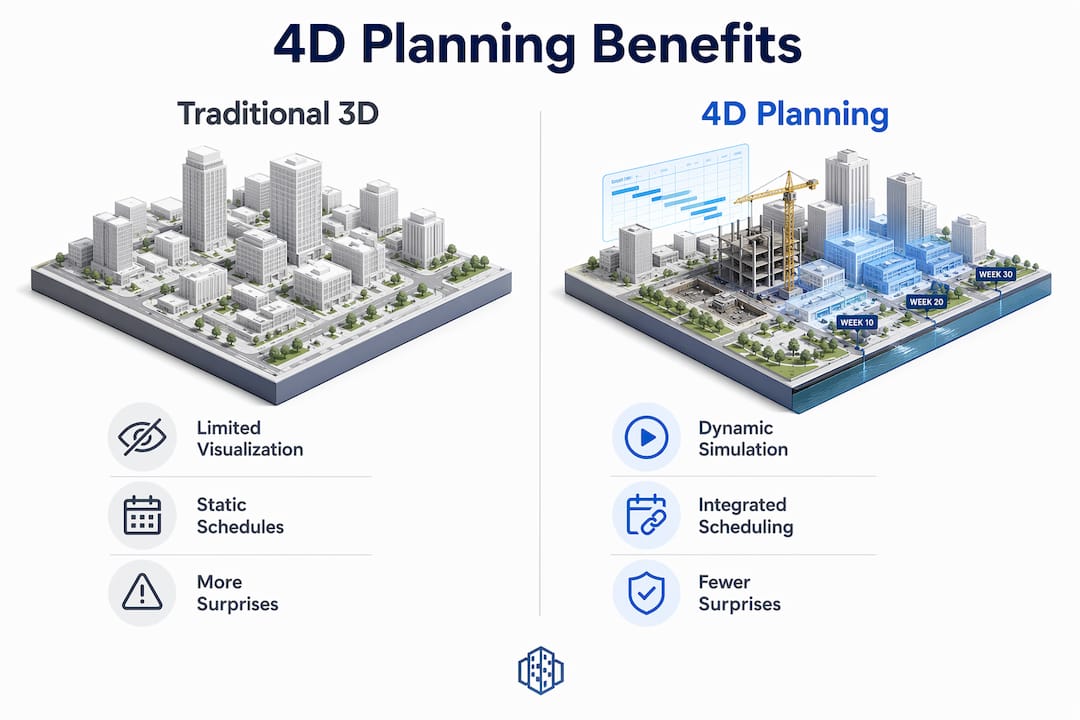
The table below compares traditional approaches with 4D planning across the areas that matter most to urban planners and architects.
| Area | Traditional 3D or Gantt Approach | 4D Planning Advantage |
|---|---|---|
| Clash detection | Spatial clashes only, at a fixed point in time | Temporal clashes identified across the full programme sequence |
| Logistics planning | Relies on written method statements | Visual simulation of site access, crane positions, and material flow |
| Stakeholder communication | Static renders or abstract schedules | Animated phasing sequences accessible to non-technical audiences |
| Risk management | Risks identified reactively on site | Conflicts resolved before mobilisation through programme simulation |
| Programme reliability | Gantt charts updated manually | Live model reflects current sequence and highlights downstream impacts |
Projects applying 4D planning early report fewer surprises, faster approvals, tighter cost control, and safer working environments. Those outcomes are not coincidental. When every team member can see the same time-phased model, misunderstandings about sequencing and access disappear before they become costly problems on site.
For urban planners specifically, the benefits extend into the planning consent process. A 4D simulation of a phased masterplan is a far more persuasive tool in a public consultation or planning committee than a series of static renders. It answers the question that residents and councillors always ask: what will this look like, and for how long, at each stage?
What are the common challenges in implementing 4d planning?
The most common mistake teams make when starting with 4D planning is attempting to model every single activity in detail. This produces an unmanageable model that takes weeks to build and is obsolete before it is finished. Effective 4D planning is selective, not exhaustive.
Several other pitfalls appear consistently across projects:
- Inaccurate or unvalidated schedules. The credibility of any 4D model depends entirely on the quality of the underlying programme. A schedule built without input from site teams will produce a simulation that looks authoritative but reflects assumptions rather than construction reality.
- Lack of multidisciplinary involvement. Early involvement of site teams provides essential insights on temporary works, access constraints, and trade interfaces that office-based planners cannot anticipate alone.
- Treating 4D as a presentation tool. Many teams produce a 4D animation for a planning submission or client presentation and then abandon the model. This wastes most of the potential value.
- Insufficient model granularity for the task. A masterplan-level 4D model needs different detail to a construction-phase model. Mismatching model detail with programme granularity creates confusion rather than clarity.
Pro Tip: Embed 4D planning into your regular project management cycle. Use it in progress review meetings, re-planning sessions, and change management discussions. A 4D model used weekly is worth ten times more than one produced once for a presentation.
Cultural adoption is often the harder challenge. Multidisciplinary collaboration matters more than technology when it comes to making 4D planning work. Teams that share ownership of the model, update it regularly, and use it to make decisions consistently outperform those that treat it as a specialist deliverable produced by one person in isolation.
How is 4d planning applied in urban redevelopment and housing projects?
Urban redevelopment projects are where 4D planning delivers some of its most tangible value. Consider a mixed-use regeneration scheme on a former industrial site, delivered in four phases over eight years. A 4D masterplan allows the project team to simulate each phase in sequence, showing how temporary uses occupy land between construction phases, how infrastructure is installed and later adapted, and how public realm evolves as each building completes.
In housing development, 4D planning optimises build sequencing across multiple plots. A developer building 300 homes across six phases can use a 4D model to identify where groundworks in phase two will conflict with occupied roads serving phase one residents. Resolving that conflict in the model costs nothing. Resolving it on site costs time, money, and community goodwill.
Infrastructure projects benefit equally. A 4D simulation of a new tram corridor, for example, can show how utility diversions, temporary traffic management, and permanent track installation interact across a two-year programme. Contractors, local authorities, and residents can all engage with the same visual model rather than interpreting separate documents.
Digital twin platforms extend these capabilities further. When a 4D urban design model is embedded within a digital twin environment, planners can compare alternative phasing scenarios side by side, test the impact of programme delays on downstream phases, and present options to stakeholders in a format that requires no technical training to understand. That combination of spatial accuracy and temporal transparency is what makes 4D planning genuinely useful rather than merely impressive.
Collaboration across disciplines also improves measurably. When architects, structural engineers, MEP consultants, and contractors all work from the same time-phased model, interface management becomes proactive rather than reactive. The 4D model becomes a single reference point for the entire project team, replacing the fragmented combination of drawings, schedules, and method statements that typically govern complex projects.
Key takeaways
4D planning is most effective when it is treated as a live management tool, built on validated schedules, and embedded into collaborative project workflows from the earliest stages of design.
| Point | Details |
|---|---|
| Core definition | 4D planning links 3D spatial models with time-based schedules to simulate project sequencing dynamically. |
| Schedule quality is critical | A flawed programme produces a misleading simulation; validate schedules with site teams before linking to the model. |
| Focus modelling effort selectively | Prioritise high-risk scopes such as crane paths and access routes rather than modelling every activity in detail. |
| Cultural adoption drives value | Teams that use 4D models in regular reviews and decisions outperform those that treat it as a one-off visualisation. |
| Urban applications are broad | Phased redevelopment, housing sequencing, infrastructure works, and stakeholder engagement all benefit from 4D planning. |
Why 4d planning adoption still has room to grow
Anne Dullemond, Urban Planning Specialist
Having worked with urban planners and architects across a range of complex redevelopment projects, I have seen 4D planning used brilliantly and I have seen it used badly. The difference almost never comes down to the software. It comes down to whether the team genuinely believes the model is worth maintaining.
The teams that get the most from 4D planning are the ones who stop thinking of it as a BIM deliverable and start thinking of it as a planning language. When a site manager updates the programme and the 4D model reflects that change in the next morning’s review meeting, something shifts. Decisions get made faster. Conflicts get resolved earlier. The model earns trust.
What I find underappreciated is how powerful 4D planning is for stakeholder engagement in urban projects specifically. A planning committee presented with a time-phased simulation of a regeneration scheme understands the project in a way that no set of drawings can achieve. That clarity accelerates consent processes and reduces objections grounded in misunderstanding.
The evolution toward 5D cost integration and 6D sustainability modelling is already underway. Planners and architects who invest in 4D capability now are building the foundation for that broader digital maturity. The technology is ready. The main task is building the workflows and the culture to match.
— Anne Dullemond
See 4d planning in action with 3d cityplanner
3D Cityplanner is a browser-based urban design platform built for planners and architects who need to design, analyse, and compare spatial development scenarios in 3D. The platform combines GIS data, 3D city models, and scenario planning tools to support time-phased masterplanning, feasibility studies, and stakeholder communication.
Whether you are working on a phased redevelopment, a housing scheme, or an infrastructure corridor, 3D Cityplanner gives you the spatial modelling environment to bring your programme to life. You can explore digital twin urban planning capabilities, compare phasing scenarios side by side, and present your work to stakeholders in a format that is immediately legible. A free trial is available to get started without a lengthy procurement process.
FAQ
What is the 4d planning definition used in construction and urban design?
4D planning is the integration of a 3D spatial or building model with time-based scheduling data to simulate construction sequences and phasing. The result is a dynamic model that shows how a project evolves at any point in the programme.
How does 4d planning differ from a standard gantt chart?
A Gantt chart shows task durations and dependencies in two dimensions. A 4D model adds spatial geometry, so you can see exactly where and when each activity occurs on site and identify conflicts that a schedule alone cannot reveal.
What software is used for 4d planning?
Common platforms include Autodesk Navisworks, Synchro Pro, and Autodesk Construction Cloud. These tools link 3D model elements to programme tasks and generate dynamic simulations for review and stakeholder presentation.
Why does schedule quality matter so much in 4d planning?
The credibility of a 4D simulation depends entirely on the underlying programme. An inaccurate or unvalidated schedule produces a simulation that looks authoritative but reflects incorrect assumptions, which can mislead project decisions.
How is 4d planning used in urban masterplanning?
Urban planners use 4D masterplans to simulate phased development sequences, show how temporary uses occupy land between construction phases, and present complex multi-year programmes to planning committees and communities in a clear, visual format.
Recommended
- 4D planning: Transform urban design with dynamic insights – 3D Urban Development
- Role of 4D planning in urban projects for better outcomes – 3D Urban Development
- Master 4D planning in urban design for 25% faster projects – 3D Urban Development
- Why urban planners use 4D simulation in 2026 – 3D Urban Development


